CRM & Leads
How to Migrate to a New Real Estate CRM Without Losing Lead History
A practical sequence for moving real estate CRMs: audit what you have, export early, map fields honestly, and validate the import before the old system goes.
Introduction
Most agents stay on a CRM they dislike because the alternative is losing eight years of history. That is a reasonable fear, and it is also the thing that keeps people paying for software they have stopped using properly.
Migration is not technically difficult. It goes wrong for ordinary reasons: fields nobody mapped, duplicates multiplied instead of merged, and an old system switched off before anyone had worked a full week in the new one.
This article is the sequence that avoids that, whatever you are moving between. If you are leaving Follow Up Boss or kvCORE, a dedicated guide fills in what its export contains and what RealFoyer's import accepts from it: Migrating from Follow Up Boss to RealFoyer and Migrating from kvCORE to RealFoyer.
⚡ Quick answer — how do you migrate a real estate CRM without losing history? Export everything before you give notice, decide explicitly what happens to every field that does not have an obvious home, test the import on a representative sample rather than the first fifty rows, and keep the old system readable until the team has genuinely worked a month in the new one. The history you lose is almost never the contact details — it is the notes, the source, and the dates.
What you are actually trying to keep
Worth being specific, because "our data" hides the important distinction.
Easy to move, and the least valuable. Names, emails, phone numbers, addresses. Every system has these fields and they map cleanly. This is also what most migration tools mean when they say they preserve your data.
Hard to move, and where the value is. Notes. Communication history with dates. Which source produced the lead. When someone was last contacted. Stage history. Appointment records. The reason a lead was marked lost. Who owns each lead. And the one that is easiest to overlook and worst to get wrong: who has unsubscribed, and from what.
The asymmetry is the whole problem. A migration that moves 100% of contacts and 20% of history is usually described as successful, and it has thrown away the thing that made the database worth keeping.
Rank your fields by that test before you start: if this disappeared, would I notice in six months? Dates and notes almost always survive that question. A "lead temperature" field usually does not.
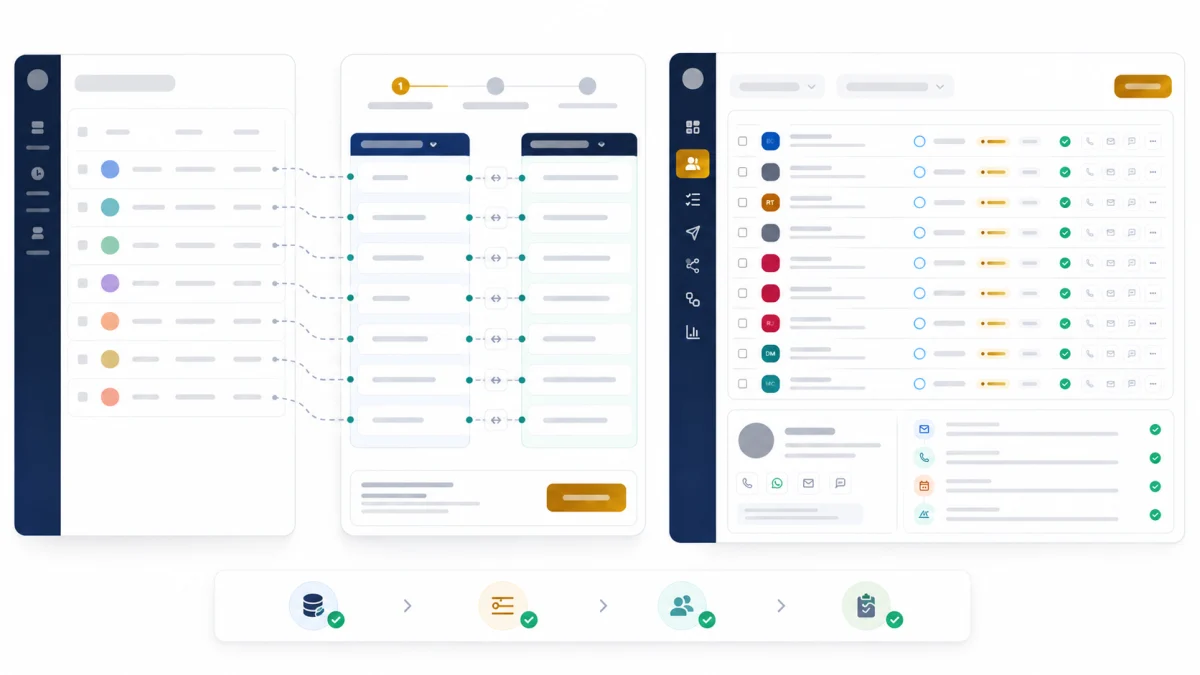
The sequence
- 1
Audit
What is actually in the old system, and what of it do you use
Most databases contain years of fields nobody has read
- 2
Export
Get everything out, including what you think you don't need
Export before you negotiate an exit — access can end abruptly
- 3
Clean
Deduplicate, fix formats, resolve conflicting records
Cheaper now than after import, by a wide margin
- 4
Map
Old field to new field, with a written decision for every unmatched one
The unmatched fields are where history quietly disappears
- 5
Test import
A representative sample — not the first 50 rows
The checkpoint. Last cheap moment to find a mapping error
- 6
Validate
Counts, spot-checks, and a few records you know by heart
Check the complicated records, not the tidy ones
- 7
Full import
The whole database, with the old system still live
Never decommission the source on the same day
- 8
QA and parallel running
Both systems readable while the team works the new one
Keep the old export archived long after you stop needing it
The order is the point. Most failures are a mapping decision made after the test import, or an old system switched off before anyone worked a full week in the new one.
1. Audit
List what exists: record counts by type, custom fields and how many records actually populate them, and any automation or template you would have to rebuild.
The useful output is a decision about scope. Databases accumulate fields nobody has read in years, and migrating them costs mapping effort, review time and a messier destination. It is legitimate to leave data behind — deliberately, in writing.
2. Export
Export before you give notice, and before you negotiate anything.
The reason is unglamorous: access to a system you are leaving can end faster than expected, and an export is much harder to obtain from an account in dispute or a trial that lapsed. Get a full export while your relationship with the vendor is uncomplicated, then keep it.
Take everything, including what you decided to leave behind. An archived CSV costs nothing and answers the question you did not anticipate. Check what the export actually contains — notes and communication history are frequently excluded from a default export, and that is exactly the data you most need.
If a vendor cannot give you a complete export in a standard format, treat that as information about the vendor.
3. Clean
Cleaning is dramatically cheaper before import than after.
Deduplicate. The main event. Match on email first, then phone, then name plus address. Merge rather than delete — a duplicate usually holds notes the primary record does not, and deleting it silently discards them.
Normalise formats. Phone numbers, dates, provinces and states, country codes. Boring, and the cause of most import failures.
Decide about the dead. A contact with no activity in six years and a bounced email is not history, it is weight. Archive rather than migrate.
Fix the obvious. Test records, records with your own email, entries named "asdf".
4. Map
Field by field, with a written decision for every one.
Three outcomes per field: it maps to an equivalent, it maps somewhere imperfect, or it has no home. The third category is where migrations quietly lose history — those fields do not error, they simply do not arrive.
For fields with no home, the workable fallback is to append them into the notes with a label. A note reading [Legacy: Referral source — Sarah M, 2021] is inelegant and infinitely better than a deleted field.
Two mappings that deserve deliberate attention because they are usually wrong:
Dates. If your import stamps every record with today's date, you have lost the chronology, which is most of what history means. Confirm original dates survive before the full import — this is the single most common irreversible loss.
Lead source. Rarely maps cleanly because taxonomies differ. Decide the destination taxonomy first, then map into it, rather than importing the old values and reconciling later.
Consent and unsubscribe state. This one is not merely history. If someone unsubscribed in the old system and arrives in the new one as a fresh, mailable contact, your first send after the migration goes to people who asked you to stop. Treat the suppression list as a required field, not an optional one, confirm it imported before any campaign runs, and remember that consent is usually a category rather than a single flag — someone may have left the newsletter and kept their listing alerts. Email marketing for agents covers that distinction, and the obligations that apply depend on where your recipients are.
Lead owner. Agent names rarely match user accounts across systems. Decide what happens to leads owned by someone who has left before the import, not after, or they arrive unassigned and no one notices.
5. Test import
A representative sample — 50 to 100 records chosen for difficulty, not the first fifty rows. Include an old record, a record with many notes, a merged duplicate, a record with unusual characters in the name, and one you know by heart.
This is the checkpoint. After the full import, fixing a mapping error means unpicking thousands of records.
6. Validate
Counts. Records in versus records out, with the difference explained. "We're 340 short" needs an answer before you proceed.
Spot-check the complicated ones. Tidy records always look fine. Check the messy ones.
Verify the chronology. Open the record you know well. Is the history in the right order with the right dates?
Check what silently emptied. A field that imported as blank across every record is a mapping failure that no error message reported.
7. Full import
With the old system still live. There is no reason to decommission on the same day and every reason not to.
8. QA and parallel running
Work in the new system, keep the old one readable. A month is a reasonable minimum — long enough to hit the monthly rhythms of the business, and to find the report nobody thought about.
Then archive the export permanently. Storage is free; the question you cannot answer in 2029 is not.
That overlap is also the way back. There is no clean rollback from a CRM import once people have worked in the new system for a week, so the retained export and the still-readable old system are the recovery plan. Keep both until the new system has survived a full monthly cycle.
Rolling it out to a team
Migrating the data is the easy half.
Do not run two live systems. A read-only old system and a live new one is fine. Two live systems produce records in both, and reconciling that is worse than the original migration.
Pick a cutover moment and state it plainly. "From Monday the 3rd, new leads go in the new system." Ambiguity here is what creates the two-live-systems problem.
Train on the three habits, not the feature tour. Where leads arrive, how to log a conversation, how to book an appointment. Everything else can wait.
Expect a dip. Weeks one and two are slower. Teams that panic at the dip abandon migrations halfway, which is the worst possible outcome — half the history in each system.
Name someone to own it. Migrations without an owner stall at 80%, which looks finished and is not.
What RealFoyer supports
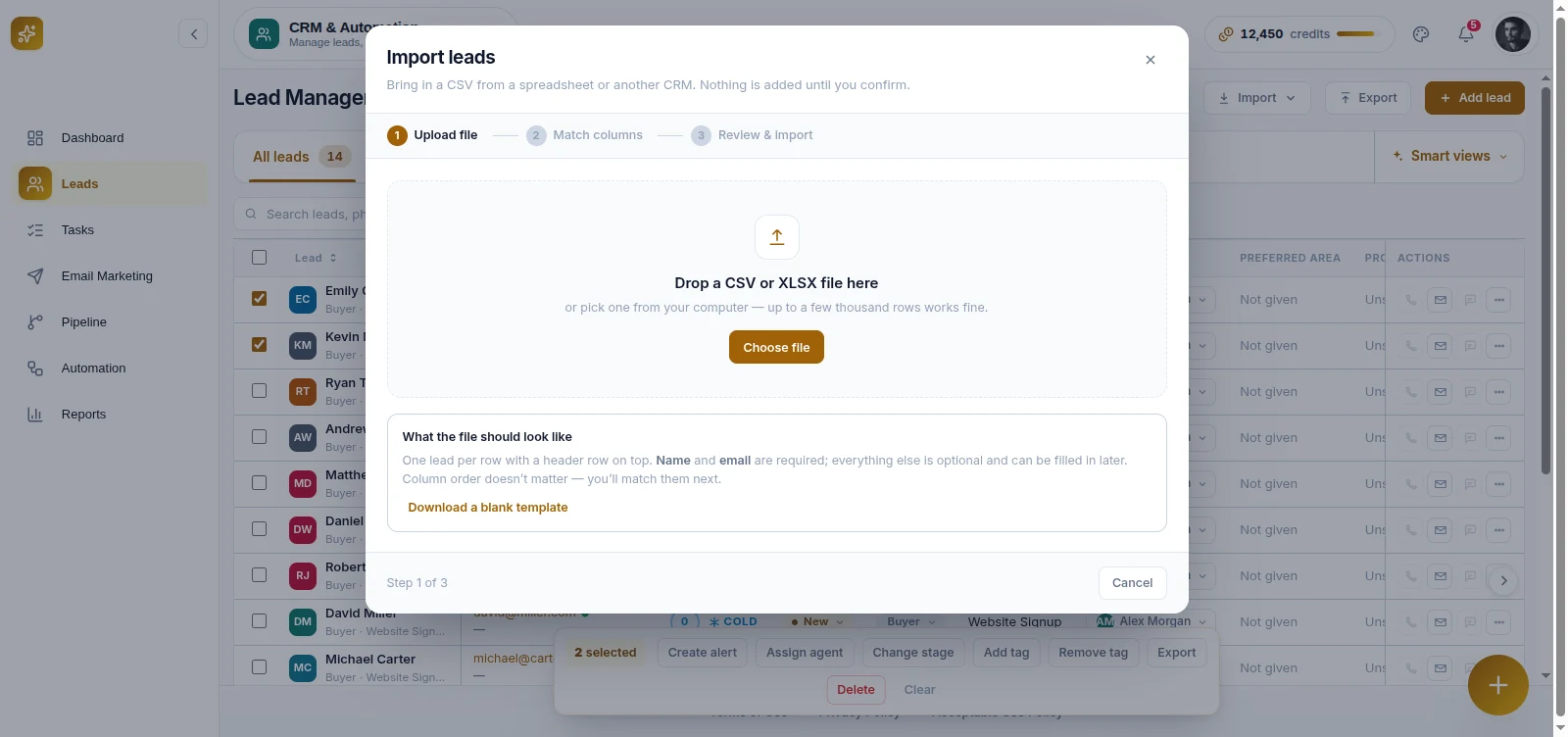
Lead import and lead export. Leads can be imported from a file, and exported at any time — including enquiry export. That is the verified capability.
Two things worth being clear about, because migration is a topic where vague claims do real damage:
There is no automatic field mapping from a named competitor. Any migration into RealFoyer involves mapping your export to the destination fields, as described above. Do not assume a one-click path exists because a comparison page implies one.
Three CRMs connect, and new leads flow one way. Zoho CRM, GoHighLevel and Zapier can be connected as destinations, and RealFoyer pushes new leads to them as they arrive — so enquiries do not have to be copied by hand. Nothing is read back from the other system. Platforms outside that list, kvCORE, AgentLocator, Follow Up Boss, HubSpot and Salesforce among them, are not connected.
A sync is not a migration. A connection keeps new leads flowing while both systems are running. The history you already hold still moves as an export and an import, which is the work the rest of this article describes.
The export side matters as much as the import side, and it is the part people evaluate last. Being able to get your data out at any time is what keeps the next migration from being this conversation again.
FAQ
How long does a CRM migration take? The data work is usually days. The team transition is weeks. Plan for the second one.
Should I migrate everything? No. Migrate what you would notice missing in six months, archive the rest. A cleaner destination is worth more than a complete one.
What if the old system won't export notes? Ask specifically — notes are often available through a different export than the contact one. If they genuinely are not, screenshot or print the records that matter most and attach them to the new record. Inelegant, and better than losing them.
Can I migrate mid-year without disrupting deals? Yes, if active deals are handled deliberately: migrate them first, verify them individually, and have the responsible agent confirm each one looks right before cutover.
What about email history? Usually the hardest thing to move and often the least necessary — your email client still has it. Prioritise notes and logged outcomes over raw message bodies.
How do I know the migration worked? Someone picks a lead they remember well, opens it in the new system, and can tell the story of that relationship from the record. If they can, it worked.
In short
The history worth keeping is the notes, the dates and the sources — not the contact details, which move easily and are the least valuable thing you own.
Export early, decide explicitly what happens to every field, test on your hardest records rather than your first ones, and keep the old system readable for a month after you think you are done.
Moving from another system? Book a demo and bring your current export — we will tell you plainly what carries across and what does not.
Related reading
- Real Estate CRM: How Agents, Teams and Brokerages Should Actually Use One
- Lead Scoring for Real Estate
- Real Estate Lead Routing
- Migrating from Follow Up Boss to RealFoyer
- Migrating from kvCORE to RealFoyer
Research Integrity
Published 16 August 2026. RealFoyer's verified capabilities here are lead import from a file and lead export, both confirmed against the production codebase. The article states explicitly that no automatic field mapping from a named competitor exists, because migration content is where unverifiable integration claims most commonly appear. No statistics are cited: figures in circulation about migration failure rates and data loss percentages trace to vendor marketing rather than to sources that survive checking, and the argument here rests on mechanism instead. The closing link was added on 16 August 2026 once the destination carried real content.
Corrected 29 September 2026, then corrected again the same day against the backend. The first correction replaced "there are no direct integrations" with a list of eight connected CRMs and a two-way sync, on the strength of what the CRM product page listed and an owner confirmation. The product page turned out to be the weaker source: its list had been copied from a prototype screen whose connection states are hardcoded fixtures. crm-apis/services/crmIntegrations/registry.js declares exactly three integrations — Zoho, GoHighLevel and Zapier — each with capability create_lead, plus update and delete on Zapier, and no inbound path at all. So the direction claim is withdrawn and the list is the three the backend implements. Follow Up Boss, HubSpot and Salesforce appear in no production repository. The export-and-import guidance still describes moving historical records, which remains file work.