CRM & Leads
Real Estate CRM: How Agents, Teams and Brokerages Should Actually Use One
What a real estate CRM holds that a generic one doesn’t, the workflow a lead should move through, and the habits that decide whether it survives a busy week.
Introduction
Most agents don't lose deals for lack of leads. They lose them in the gap between a lead arriving and someone doing something useful about it — and that gap is usually not a motivation problem. It is that the person who has to act cannot quickly tell what they are looking at.
A CRM's job is to close that gap. Not by being clever, and not by having more fields. By making the answer to what is this and what should I do about it available in the ten seconds someone actually has.
This article covers what a real estate CRM holds, the workflow a lead should move through, and the operating habits that decide whether the system survives a busy week. Scoring, routing strategy, response speed and migration each get their own article; here they get a paragraph and a link.
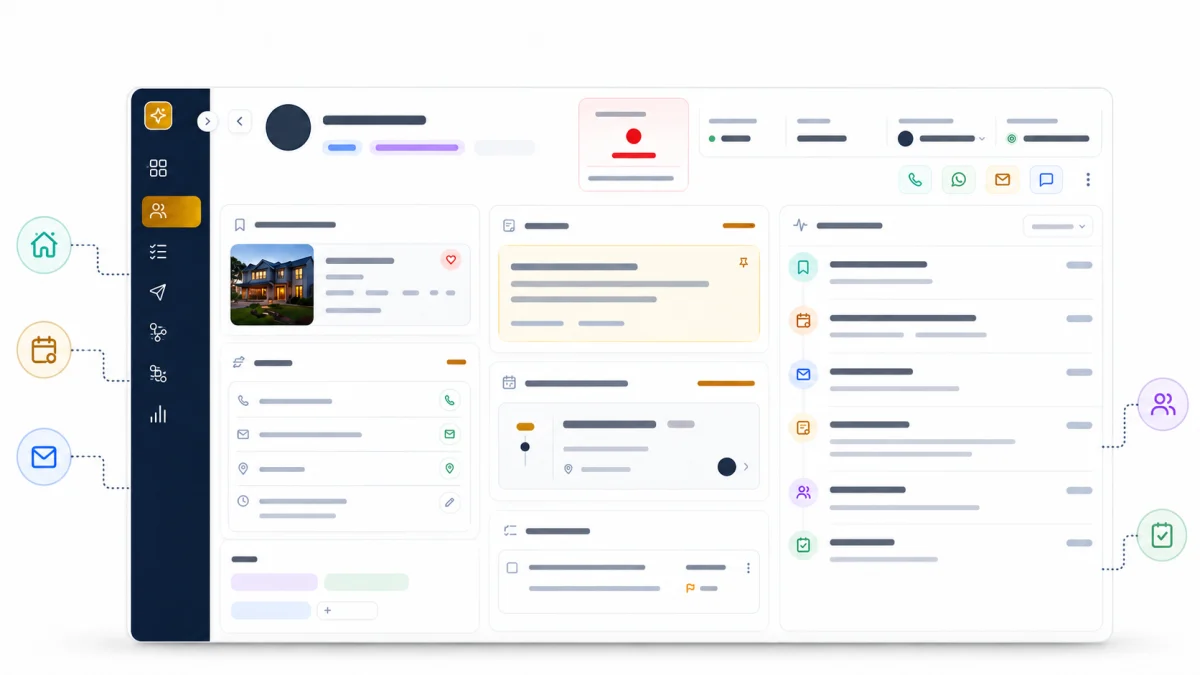
⚡ Quick answer — what is a real estate CRM for? Holding one record per person, with everything that person has done attached to it — including what they looked at on your website. A generic CRM records what you type in. A real estate CRM also records what the buyer did while you weren't watching: properties viewed, searches saved, alerts set, enquiries sent. That context is what turns a follow-up call from a check-in into a conversation.
What the CRM is actually for
Three jobs, in order of how often they are the thing that fails.
Nothing gets lost. Every enquiry becomes a record. Not an email in an inbox, not a text on someone's phone. A record, in one place, that still exists next March.
Context arrives with the lead. The person picking up the phone can see what this person has been looking at before they dial. This is the job generic CRMs cannot do, and it is the whole reason a real estate CRM exists.
The team can see who has what. In a team or brokerage, ownership ambiguity is more expensive than slow response. Two agents calling the same buyer is worse than one agent calling an hour later.
Everything else — reporting, permissions, stages — exists to support those three.
The workflow
- 1
Enquiry from the website
SystemA form, a saved search, an account signup or a valuation request
- 2
Lead record created
SystemOne record per person, with the enquiry attached to it
- 3
Website & property activity attached
SystemProperties viewed, searches saved, listing alerts set — recorded against the contact
- 4
Qualification
PersonA person reads the activity and decides what this lead actually is
- 5
Stage set
PersonNew → contacted → qualified → closed or lost
- 6
Assignment
SystemRound robin or routing rules assign the lead; manual override remains available
- 7
Follow-up & nurture
SystemAutomated sequences respond and nurture until personal attention is needed
- 8
Appointment or tour
PersonBooked against the lead record, where the activity trail already lives
Automation handles capture, routing, assignment and nurture. Agents keep visibility, manual override and control of the conversations that need a person.
Read that diagram for what it does not contain as much as what it does: a step where software decides what the buyer needs. Routing rules, a rules-based lead-health score and follow-up automation can all sit around the workflow, and RealFoyer supports each of them. They get a lead to the right person sooner. They do not replace the person.
That is a deliberate description of how the workflow actually runs, and it is worth being clear-eyed about, because a lot of CRM marketing implies otherwise. The system's contribution is capture and context. Every judgement in the chain is made by a person. A CRM that pretends otherwise tends to produce confident automation applied to a misread situation.
The lead record
One record per person. Everything attaches to it.
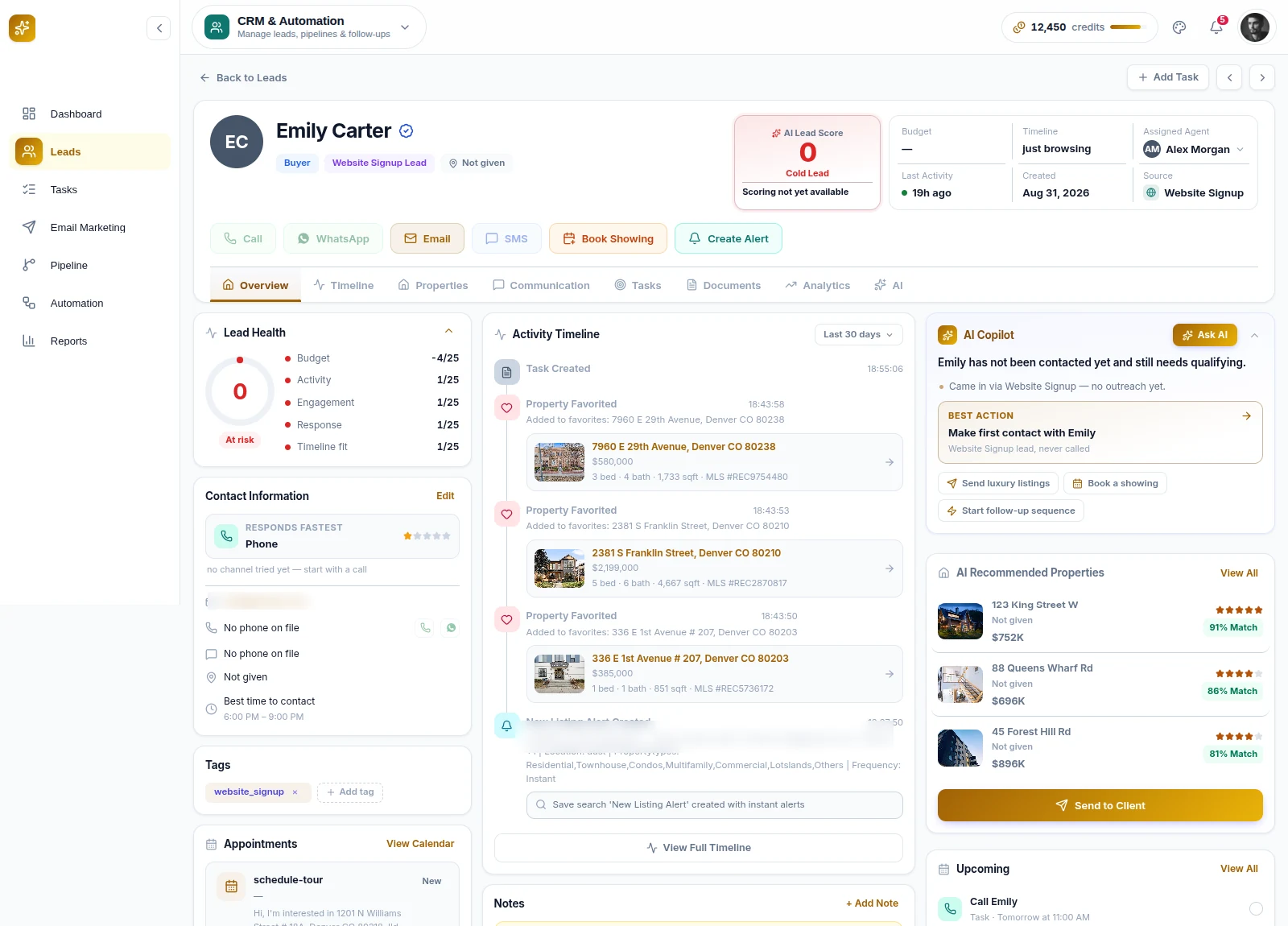
Identity and contact details — the boring part, and the part that breaks first when two records exist for the same person.
Website and property activity. Which properties they viewed, how many times, how recently. This accumulates without anyone entering it, which is why it is usually the most honest thing on the record. People misreport their budget in a form. They do not misreport which houses they looked at four times.
Saved searches and listing alerts. A saved search is a written statement of intent — this area, this price, this many bedrooms — that the person composed themselves. RealFoyer surfaces a lead's saved alerts on the lead record, and an agent can edit or pause them on the lead's behalf, which matters when a buyer's criteria change in conversation and nobody updates the search they set up in February.
Notes. Free text, written by whoever spoke to them. The single highest-value and lowest-compliance part of any CRM.
Communication history. What was sent, what was said, when. See the caveat below — this is a log, not a sending tool.
Enquiries. Which listing or page produced the question.
Any good CRM
Someone has to enter it
- Contact details
- Notes
- Stages or a pipeline
- Tasks and reminders
- Activity history you type in
Plus, in a real estate CRM
It accumulates from what the person does
Properties viewed
Which listings, how many times, how recently
Saved listings
What they chose to keep
Saved searches
The criteria they set for themselves
Listing alerts
What they asked to be told about, and how often
Enquiries
Which listing or page the question came from
Appointments and tours
Tied to a property, not just a calendar slot
The distinction is not a feature count. It is whether the record fills itself in while the person is still browsing, or waits for someone to remember to write it down.
One thing to be precise about
A CRM logs communication; it does not necessarily send it. In RealFoyer, calls, messages and conversations are recorded against the lead — you log the call, with its outcome and your notes, and it lands on the timeline. The CRM is not a phone and not a messaging platform.
That distinction sounds pedantic until you are evaluating platforms, where "communication" in a feature list can mean either thing. Ask which it is. A log is genuinely useful — it is what makes the next conversation informed — but it is a different product from a dialler.
The alert and notification email RealFoyer sends is a separate mechanism: listing alerts to buyers, notifications to agents. That is transactional mail, not a campaign, and the two report separately — email marketing is where the campaign side lives. Campaigns are their own thing — built, scheduled and sent against the lists in the CRM — so when you are comparing platforms, check which of the two a feature list is describing. Real estate email marketing covers what to send, and to whom.
Stages
Stages exist to answer one question: what has to happen next? If a stage does not imply a next action, delete it.
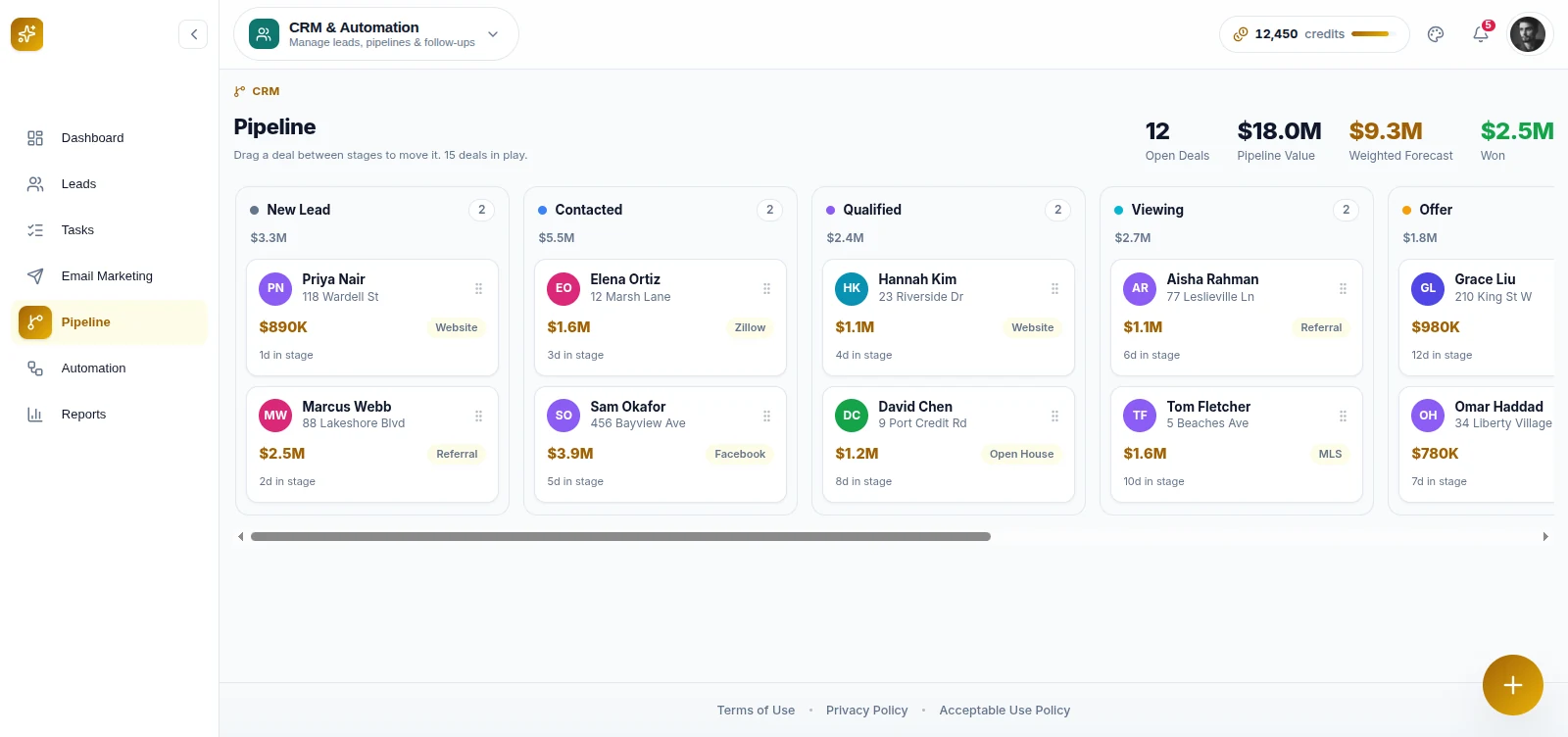
RealFoyer moves leads through new → contacted → qualified → closed or lost. Five states, which is about right. The failure mode in real estate CRMs is the eleven-stage pipeline borrowed from enterprise software sales, where stages four through seven are all "still talking" and nobody can tell them apart.
Two habits make stages work:
Lost is a real stage, and it is not an insult. A pipeline where nothing is ever marked lost is a pipeline nobody trusts, because everyone knows half of it is fiction. Marking a lead lost is how the remaining ones become meaningful.
Stage is not timeline. A buyer sitting in "qualified" for eleven months is normal in residential real estate. A long cycle is not a stalled deal, and treating stage age as a health metric produces busywork.
Assignment
In RealFoyer, leads can be assigned automatically through round robin or configurable routing rules, with automatic reassignment available when ownership needs to change. A team lead can still assign a lead manually, and every assignment is recorded on the lead's timeline.
Round robin is useful when speed and even distribution matter; rules-based routing is better when geography, language, price band, specialization or workload should influence ownership. Real estate lead routing works through those strategies and their trade-offs properly.
The operational point for a team: someone owns every lead, and everyone can see who. How you decide the owner matters less than that the decision is made and visible.
Appointments and tours
Both attach to the lead record, which is the only detail that matters. An appointment in a calendar is a time. An appointment on the lead record sits next to the six properties they viewed and the search they saved, so the agent walks in knowing what this is about.
Tours specifically are worth booking against the record rather than the calendar, because the properties involved are part of the history you will want in three weeks when they ask "which one had the finished basement?"
Team roles and permissions
Once more than one person uses the system, two questions arrive: who can see which leads, and who can change what.
RealFoyer supports staff members with roles and permissions. The useful principle is narrower than the feature: default to visible, restrict deliberately. Over-restricted CRMs get worked around — leads live in someone's phone, and the system stops reflecting reality. Restrict the things that genuinely need it (billing, deleting, other agents' private notes) and leave the rest open.
Reporting
RealFoyer reports on leads, listings, activity and marketing.
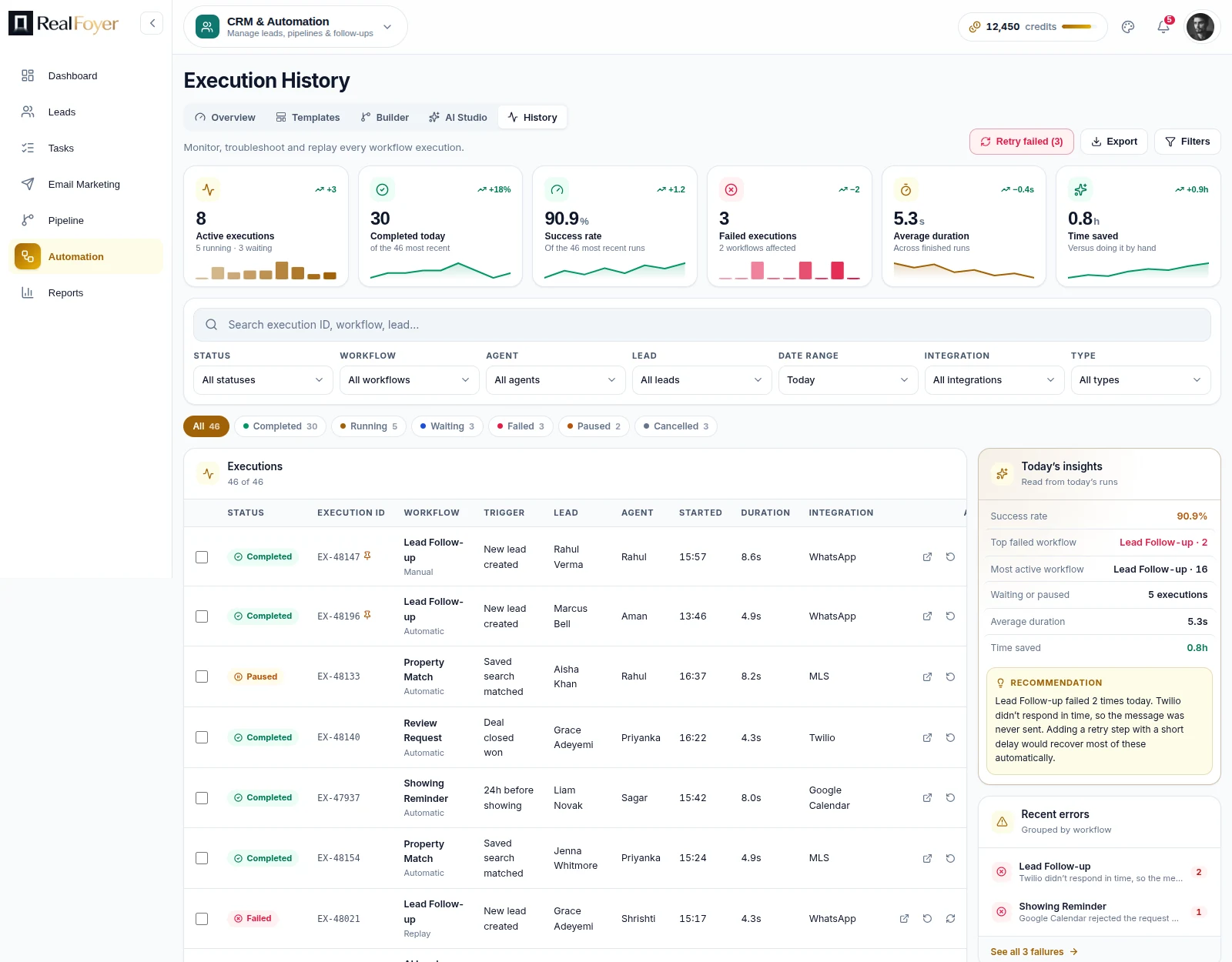
The trap is that dashboards measure what is easy to count. Lead volume is easy. Response quality is not. A team optimising for the numbers on a dashboard usually gets more leads handled worse.
Two questions worth answering with the data, both of which need discipline elsewhere to be answerable at all:
- How many enquiries turned into a conversation? Requires that conversations get logged.
- How many conversations turned into an appointment? Requires that appointments get booked in the system rather than by text.
If the answer to either is "we can't tell", the fix is an operating habit, not a report.
The CRM assistant answers questions about your own leads and listings without a report being built; AI marketing for real estate covers what it does and does not do.
Getting people to actually use it
This is the part that decides whether any of the above happens, and it gets the least attention.
Pick the smallest possible discipline and hold it. For most teams that is: every lead gets a stage, every conversation gets logged, every appointment gets booked in the system. Three habits. Not fifteen fields.
Log the call in the two minutes after it, not at the end of the week. Friday-afternoon logging produces "left VM" on twelve records and no usable information. If the note has to be short, let it be short — wants the Bronte listing, husband hates the kitchen is worth more than a paragraph written from memory six days later.
Do not add a field until someone has asked for it twice. Every field is a small tax on every future record, and unused fields make the record harder to read, which is the one thing that must stay easy.
Decide what "lost" means and say it out loud. Teams that never agree this never mark anything lost.
The measure of adoption is not login frequency. It is whether the person picking up a cold lead six weeks later can tell what happened.
Where the other pieces fit
Four things this article deliberately does not cover in depth:
Which leads to work first. A record tells you what happened; it does not tell you who to call. Lead scoring for real estate covers the signals worth weighing — and is honest that RealFoyer records several of them without calculating a score.
How fast to respond, and what "fast" is actually buying you. Speed to lead covers the operating pattern.
Who should get the lead. Lead routing.
Moving from an existing system without losing history. CRM migration.
FAQ
Do I need a real estate CRM, or will a general-purpose one do? Solo, early, with few leads — a general CRM plus discipline works. The moment website behaviour matters to your follow-up, the general CRM stops being able to hold the thing you need, because it has nowhere to put "viewed this listing four times."
What is the difference between a CRM and a lead-gen platform? Lead generation produces enquiries. A CRM holds them and what happened next. Platforms that do both share one record between the website and the CRM, which is what makes property activity available on the contact.
How many stages should a pipeline have? Fewer than you think. Five is usually right. Each one has to imply a different next action.
Should every lead get a follow-up sequence? Not every lead, and not without an exit rule. RealFoyer's CRM supports follow-up and lead-nurture workflows, which earn their place for the first acknowledgement and for long-timeline leads; the email marketing guide sets out how to design one that stops when a person should take over. Beyond that, consistency beats frequency — a real note in the calendar for a real reason outperforms a cadence nobody sustains.
What should I log after a call? What they want, what changed since last time, and what happens next. Three sentences. Anything longer will not get written.
How long should we keep dead leads? Longer than feels useful. Residential cycles run years, and the cost of a stale record is close to zero next to the cost of losing the history on someone who resurfaces.
In short
A real estate CRM earns its place by holding one record per person with property activity attached, so that whoever picks it up knows what they are looking at.
The system captures and provides context. The judgements — qualify, stage, assign, respond — are human, and no honest description of the workflow pretends otherwise. What decides the outcome is not the feature list. It is whether three small habits survive a busy week.
Explore RealFoyer CRM — leads arrive with the properties they viewed and the searches they saved already attached to the record.
Related reading
- Lead Scoring for Real Estate
- Speed to Lead in Real Estate
- Real Estate Lead Routing
- How to Migrate to a New Real Estate CRM
- Real Estate Website Conversion
Research Integrity
Rewritten 16 August 2026 and corrected 23 August 2026. RealFoyer supports automated lead routing, round-robin distribution, configurable assignment rules, automatic reassignment, follow-up workflows and lead nurture. Communication logging remains distinct from SMS, WhatsApp or click-to-call capabilities. Unsourced conversion and response-time statistics remain excluded. Corrected 22 September 2026: two sentences written before the 23 August correction still said the workflow had no routing, scoring or follow-up automation; they now match the capabilities listed above.