IDX & MLS
CREA DDF vs TRREB/PropTx: Which MLS Listing Feed Does Your Canadian Real Estate Website Need?
CREA DDF and a TRREB feed through PropTx are not the same. Compare which listings each carries, the rules and the sign-up steps, and which fits your site.
Introduction
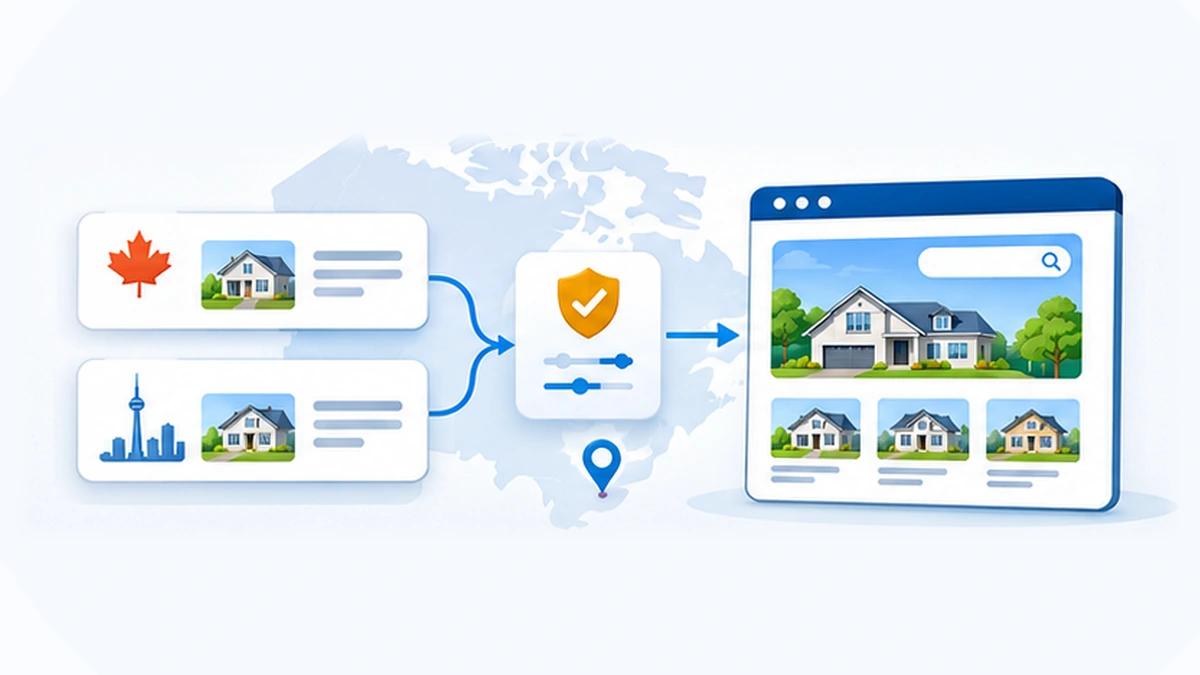
Ontario agents hear "DDF", "IDX" and "VOW" used as if they were one thing. They are three different permissions from two different organisations. CREA's DDF® is a national, permission-based service. A TRREB feed comes through PropTx, TRREB's technology subsidiary, under an IDX or a VOW agreement that your brokerage signs. The two are not interchangeable, and neither is a bigger version of the other. Which one your site needs depends on what your brokerage has agreed to, which board you belong to and what you want visitors to do. RealFoyer connects to TRREB through PropTx today, and CREA DDF® is on our roadmap; the last section says where each stands.
Every rule below was read on 19 November 2026 on a CREA, REALTOR.ca, PropTx, TRREB or RECO page. Where those pages are silent, this article says "confirm with TRREB" and does not guess.
⚡ Quick answer — is CREA DDF the same as a TRREB IDX feed? No. DDF® is operated by REALTOR.ca Canada Inc., a CREA subsidiary, and carries listings from brokerages that opt in, limited to the fields shown on REALTOR.ca. A TRREB IDX feed comes from PropTx under an IDX Data Agreement your brokerage completes, and carries the active listings of opted-in brokerages. A VOW feed is a third thing, for visitors who register and sign in.
DDF, IDX and VOW at a glance
| CREA DDF® | TRREB IDX (PropTx) | TRREB VOW (PropTx) | |
|---|---|---|---|
| Who runs it | REALTOR.ca Canada Inc., a CREA subsidiary | PropTx, a TRREB subsidiary | PropTx |
| Which listings | Your own or your brokerage's, or the national pool | Active listings of opted-in brokerages | Confirm with TRREB |
| Sold data | Not provided for in the DDF® rules | Confirm with TRREB | A 2019 TRREB FAQ allows it. Confirm with TRREB |
| Update speed | Sites refresh at least every 24 hours | Confirm with TRREB | Refreshed at least every 24 hours |
| Data per listing | REALTOR.ca's display fields, or fewer | Confirm with TRREB | Confirm with TRREB |
| Visitor sign-in | None in the rules | None stated by PropTx | Yes, with a password |
| Coverage | National, among brokerages that opt in | Confirm with TRREB | Data the member has rights in |
| Who signs | Your brokerage opts in on the DDF® Dashboard | Your brokerage, the IDX Data Agreement | Your brokerage, the VOW Datafeed Agreement |
| Fits when | You want your own listings, or a national pool | You want other brokerages' listings on a public site | You serve signed-in clients and customers |
Each cell is explained, with its source, in the sections below. The National Shared Pool excludes Quebec and Manitoba.
Ruta nacional
Fichas de las agencias participantesDDF® de REALTOR.caSu sitio web- Flujo Member Website FeedSus propias fichas, o las de su agencia
- Conjunto National Shared PoolLas fichas de los demás participantes
Ruta de la asociación (Toronto)
Sistema MLS® de TRREBPlataforma PropTxSu sitio web- Flujo IDXLas fichas activas de las demás agencias participantes
- Flujo VOWPara los visitantes que se registran e inician sesión
Las dos rutas empiezan con el consentimiento de su agencia. El Data Transfer Service de PropTx es un acuerdo aparte y no se muestra.
What is CREA DDF?
DDF® stands for Data Distribution Facility. CREA's Policy and Rules, revised June 2026, describe it as a way for members "to easily disseminate MLS® listing content to multiple websites". The same document calls it "permission based" and lists six distribution channels. Two of them matter for an agent's own website.
The Member Website Feed. Participants "can receive a data feed of their listings, or a data feed of all their brokerage's listings, to display on their own website". It is your inventory, or your office's, and nothing else.
The National Shared Pool. Participants "contribute their listings to a national data pool and receive a feed from that pool to display all other participants' listings on their websites". It is an exchange. To take from the pool you put your own listings in, and the rules say participants must contribute all of their MLS® System listings unless a seller has instructed otherwise.
Three limits follow from the document:
- It is not a copy of REALTOR.ca. Brokerages "have the option to participate or not to participate" in each channel, so the pool holds only the listings of brokerages that opted in. REALTOR.ca's technology provider page adds that "Manitoba and Quebec boards and associations do not participate in the National Shared Pool."
- The fields are limited. Listing content "will consist of only the fields provided by Boards/Associations for display on REALTOR.ca or a subset of those fields".
- It is for advertising. The rules bar using DDF® content on a website "through which a member provides online brokerage services to consumers".
What is a TRREB feed through PropTx?
PropTx describes itself as "the MLS® technology subsidiary of the Toronto Regional Real Estate Board". TRREB's data agreements are on PropTx's site, and each feed has its own agreement and its own page.
TRREB IDX
PropTx's IDX page says IDX "allows Brokerages, through reciprocal agreements, to advertise their active listings on each other's websites", and that it is offered in RESO API format. Access goes to "all Brokerages that have completed the Internet Data Exchange (IDX) Data Agreement", for "the available listings data for all opted-in Brokerages".
On who does the work, the page says: "The Brokerage/Member can access the system themselves or they can designate a third party to do it for them." The agreement is started online through PropTx's Data Syndication and Agreement System. The page gives no fee, no approval time and no field list.
TRREB VOW
A VOW is a Virtual Office Website. PropTx's VOW page says access "requires that the Brokerages sign the PropTX VOW Datafeed Agreement, in order for Members to participate", and that members may "designate an Affiliated VOW Partner (AVP)" to build the site "for their own real estate services".
The PropTx MLS® Rules (effective 2 December 2024) define a VOW as a "secure password-protected internet website". Before a consumer may search it, the member must establish a lawful broker-consumer relationship, obtain a name and a valid email address, and give each consumer a username and password. That registration step is what separates a VOW from an IDX display.
PropTx IDX vs the Data Transfer Service
These are two different agreements, and vendors sometimes blur them.
IDX is the reciprocal display of active listings described above, under the IDX Data Agreement.
The Data Transfer Service has its own page and its own Data Transfer Agreement. PropTx says "The Broker of Record must authorize your subscription to this service", the named third party must acknowledge the agreement, and afterwards "the access token will be available to the designated third party". It asks members to "allow at least 2-3 days from the receipt of the forms to the actual implementation of the API access". The page does not say what the service may be used for, so ask PropTx before assuming it covers public display.
DDF vs IDX vs VOW: the differences that matter
Which listings you get
DDF® gives you your own or your brokerage's listings, or the pool of other participating brokerages. TRREB IDX gives you the active listings of brokerages that opted in to IDX. Neither is "every listing", and DDF® does not contain every listing in Canada.
Sold data
The June 2026 DDF® Policy and Rules contain no provision for sold listings. REALTOR.ca's technology provider page says "VOW feeds often include private remarks and sold prices which are governed by different rules than IDX and REALTOR.ca DDF® data feeds." That is CREA's general description, not a statement about TRREB's feed.
For TRREB, PropTx's IDX and VOW pages say nothing about sold data. The one TRREB document we found is a FAQ revised in January 2019, when the board was still TREB,, written after the 2016 Competition Tribunal order. It answers "Can I advertise sold prices now?" with "No", and adds that sold information can be provided on a VOW in accordance with TRREB's agreements, by-law and applicable law. That FAQ is old. Confirm the current terms with TRREB before you plan a feature around sold prices.
Freshness
DDF® websites "must refresh their Websites at least once every twenty-four (24) hours" and remove content that is no longer current. On the supply side, CREA's DDF® documentation says listing content "is updated in the data feed at the same time as it appears on REALTOR.ca". The PropTx MLS® Rules require a VOW to be refreshed "at least once every twenty-four (24) hours". PropTx's IDX page states no interval.
Detail and map search
DDF® carries the REALTOR.ca display fields or fewer, and geocodes are included only where a board has opted in to providing them. What a TRREB IDX or VOW feed carries per listing is not published on the pages we read. Ask for the field list before you design search filters around it.
Rules
DDF® has one national rule set. A TRREB feed is governed by the agreement your brokerage signs and by the PropTx MLS® Rules. Our guide to MLS and IDX compliance covers the general pattern.
Which one do you need?
- "I only want my own listings on my site." The DDF® Member Website Feed is built for this, if your brokerage has opted in.
- "I want buyers to search GTA listings on my site." That is IDX: a TRREB IDX feed through PropTx, under your brokerage's IDX Data Agreement.
- "I want to show sold prices." DDF® does not provide for it. For TRREB, read the sold-data section above and confirm with TRREB.
- "I work across several boards." The National Shared Pool is national among participating brokerages, outside Quebec and Manitoba. A board feed covers that board's data, so each additional board is a separate conversation.
- "My brokerage has not opted in to DDF." Then you cannot take part. The rules say that if a brokerage chooses not to opt in, "its salespeople cannot participate". A brokerage can opt in solely to give its salespeople permission.
- 1
¿Solo quiere sus propias fichas o las de su agencia en su sitio?
Sí: El Member Website Feed del DDF® de CREA, si su agencia se ha adherido
No, entonces: Pase a la pregunta 2
- 2
¿Debe cualquier visitante ver las fichas activas de otras agencias sin iniciar sesión?
Sí: Un flujo IDX de TRREB a través de PropTx en el mercado de TRREB, o el National Shared Pool del DDF® para un conjunto nacional
No, entonces: Pase a la pregunta 3
- 3
¿Los visitantes se registrarán e iniciarán sesión para usar su sitio como clientes suyos?
Sí: Un flujo VOW de TRREB a través de PropTx, según las reglas VOW
No, entonces: Vuelva a la respuesta de la pregunta 1 o 2
Antes de todo: pregunte a su bróker responsable qué acuerdos ha firmado la agencia. Todas las respuestas anteriores dependen de eso.
How to get each feed
CREA DDF®
- Ask your broker of record whether the brokerage has opted in on the DDF® Dashboard, and to which channels.
- Get the brokerage's permission for you to participate, then opt in yourself.
- Only then choose a technology provider. The rules say you must opt in "before retaining the services of a Technology Provider", and that you "may not share or disclose" your DDF® credentials with one.
TRREB IDX through PropTx
- Confirm with your broker of record that the brokerage has completed the IDX Data Agreement.
- Decide whether the brokerage accesses the feed itself or designates a third party.
- Start or update the agreement in PropTx's Data Syndication and Agreement System. For anything the page does not answer, PropTx lists its Data Administrator's contact details.
Our TRREB page explains what the feed carries once it is connected, and how to add MLS listings to your website walks through the general steps.
Questions to ask a website vendor
- Which feed do you use for my board: DDF®, IDX or VOW?
- Who signs the agreement, and what do you need from my broker of record?
- How long has approval taken for your other clients on this board?
- Which listings and which fields will my site show?
- Are the listing pages on my domain? Plugin, widget or integration explains why that matters.
- Where do enquiries go, and who else receives them?
- What does it cost in total, including anything the board charges? MLS and IDX fees by board quotes what boards publish.
- How do I cancel, and what happens to my site if I do?
Rules you can't skip
- DDF® display. Every listing must show the "Powered by REALTOR.ca" logo linked to that listing on REALTOR.ca, and the listing brokerage's name in text a consumer can easily read. Every page needs an MLS® and REALTOR® trademark statement and the name of the brokerage or salesperson who controls the site.
- DDF® limits. No more than ten websites per participant. No changing the listing content. The June 2026 edition allows AI or virtual-staging "Augmentation" only if the original is shown first and the change is disclosed.
- VOW registration. Under the PropTx MLS® Rules a VOW must be password-protected, and each consumer's password is valid for no more than 90 days before renewal.
- Refresh and removal. At least every 24 hours for DDF® sites and for VOWs.
- Ontario advertising. RECO's bulletins under TRESA say "All advertising must include the name of the brokerage", and that the requirements apply to websites.
This article is not legal or regulatory advice. Your broker of record, TRREB and RECO have the final word.
Can you use both?
In principle, yes. The DDF® rules let participants "co-mingle other listings with the Listing Content they receive through the DDF®". A brokerage could hold a TRREB agreement for the Toronto area and use the National Shared Pool for listings elsewhere. It makes sense when your clients buy outside your board's territory. It adds work, because each feed keeps its own display rules on the same site, and whether your TRREB agreement allows the combination is a question for TRREB.
How RealFoyer handles it
RealFoyer is connected to the Toronto Regional Real Estate Board, so a RealFoyer website can carry TRREB property search, listing pages, saved searches and alerts for the Toronto and GTA market. TRREB distributes its data through PropTx, and RealFoyer connects there, not through a third-party aggregator. A feed is activated for each agent after that agent's board approves it, and we check the board, the feed and the licence with you before launch.
RealFoyer connects to TRREB through PropTx today. CREA DDF® is on our roadmap and the ingestion work is built; ask us about availability for your brokerage. Our coverage list shows where each board stands.
For what the TRREB connection includes, see MLS and IDX integration, IDX websites and pricing.
FAQ
What is CREA DDF? The Data Distribution Facility, a permission-based service operated by REALTOR.ca Canada Inc., a subsidiary of CREA. It sends participating brokerages' listing content to their own websites, to a national shared pool and to other channels.
What is the difference between DDF and IDX? REALTOR.ca's own page says DDF® is "similar to IDX" in that both are for advertising. The difference is who runs it and whose listings you get: DDF® is national and limited to participating brokerages and REALTOR.ca fields, while IDX is a reciprocal arrangement run by your board.
Does DDF include all listings? No. Brokerages choose whether to participate in each channel, and Manitoba and Quebec boards do not participate in the National Shared Pool.
Can I show sold listings on my website in Ontario? The DDF® rules do not provide for it. A 2019 TRREB FAQ says sold prices may not be advertised but sold information can be provided on a VOW under TRREB's agreements. Confirm the current rules with TRREB and your broker of record.
How do I get a TRREB data feed? Your brokerage completes the relevant PropTx agreement: the IDX Data Agreement for IDX, or the VOW Datafeed Agreement for a VOW. It can then access the feed itself or designate a third party.
Is PropTx the same as TRREB? PropTx Innovations Inc. describes itself as TRREB's MLS® technology subsidiary. TRREB's data agreements are on PropTx's site.
Does RealFoyer support CREA DDF? RealFoyer connects to TRREB through PropTx today. CREA DDF® is on our roadmap and the ingestion work is built; ask us about availability for your brokerage.
In short
DDF®, IDX and VOW answer different needs. DDF® puts your own listings, or a national pool of participating brokerages' listings, on your site with REALTOR.ca's fields and branding rules. A TRREB IDX feed puts other opted-in brokerages' active listings on a public site. A VOW is a signed-in service for your own clients and customers. All three start with your broker of record, so ask there first.
See the TRREB integration or check whether your board is supported.
Related reading
- MLS and IDX Fees for Agents, by Board (2026)
- RETS vs RESO Web API: What Real Estate Professionals Should Know
- MLS Plugin vs IDX Widget vs Direct MLS Integration
- MLS & IDX Compliance: What Your Real Estate Website Must Handle
- How to Add MLS Listings to Your Website: The Actual Steps
Research Integrity
Published 19 November 2026 for Canadian feed searches ("crea ddf", "ddf vs idx", "trreb idx", "toronto mls on my website"). Every rule and quoted phrase was read that day on the organisation's own page: CREA's DDF® Policy and Rules (revised June 2026), REALTOR.ca's DDF® technology provider page, CREA's DDF® documentation site, PropTx's IDX Datafeed, VOW Datafeed and Data Transfer Service pages, the PropTx MLS® Rules (effective 2 December 2024), PropTx's own site for its relationship to TRREB, a TRREB FAQ revised in January 2019, and RECO Bulletins 5.1 and 5.3. The TRREB FAQ is the only TRREB or PropTx document found that addresses sold data; it is old and is reported with its date. No vendor guide is used as a source, and nothing is stated about fees, approval times for IDX or VOW, listing counts or field lists, because none of those pages publish them. RealFoyer's own position is as the company states it: connected to TRREB through PropTx today, with CREA DDF® on the roadmap and the ingestion work built. This is not legal or regulatory advice.